alterjenny
Old Members
-
Joined
-
Last visited
-
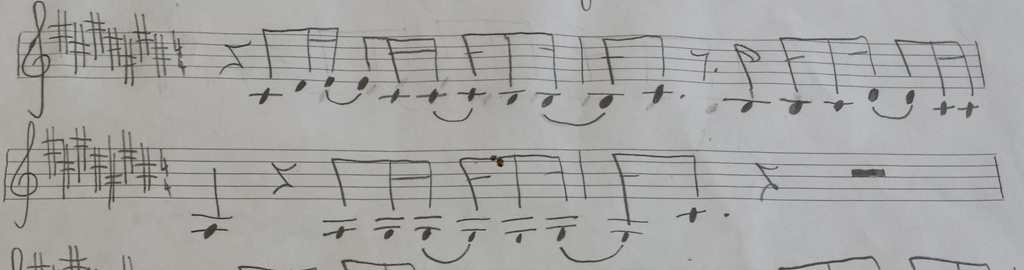
Hello Ananth! Thank you for the feedback! You really got me thinking now with your idea about leaving it handwritten :) The tattoo artist will "copy" it in her own style anyway, I just needed something to show her the correct version. I was wondering about the key signature and the sharps too. I was sticking with the original, since these are male vocals of a ballad, but maybe it wouldn't be a "sin" to make it Db or maybe Af. Would you mind doing the output in those key signature too? Thanks! J. Ps: Nice work on those Sonata(s) you have published.
-
Hello everyone! I would like to get some help from you regarding the transcription of the notes in attachment to Sibelius or similar program (maybe just an pdf export?). I am getting a tattoo , where these notes will be includes and would like to have a nicer "foundation" for the tattoo artist to work on. I do not have the knowledge to do it myself, so I am asking you for a favor. Thank you. Jenny