May 6May 6 For the first time in my life, after watching a few harmony videos, I wrote this waltz. I'm curious to hear your opinion.https://voca.ro/1juGRRVoFhLh Walzer in G-dur.pdf
May 6May 6 Hi Tristan, This sounds very nice! I would suggest finding a different composition software to use, however. The spacing of the notes on the page is a bit all over the place, which makes this challenging to sight read. Musescore is a good free option that sorts that out for you automatically. I haven't used Vocaroo, but I understand it has some AI features for editing recordings?
May 7May 7 Author "Thanks for the honest feedback! I'm glad the music itself sounds good to you. I will try to improve the visual spacing in my next pieces."
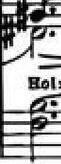
May 10May 10 Hi Tristan!Nice composition! I would say, you have a nice thematic idea. You could have progressed it, though, into d dur or perhaps c dur.As we can see here:. your writing is very messy, although using a notation software. You should know that in composition, you could always use marks such as simile. You also didn't have to keep emphasizing that it is piano and not something else like... Idk... fortississississississississississimo. As you can see, you have decided to make a triplet here at the start. Very creative, but, the problem is the notation. You need to have a 3 on the top of the triplet... Right? Adding on to my point, it doesn't even sound like a triplet, so why did you do like such? I am confused. Also, you shouldn't write ♩=120. Instead, write Italian. More fancy, you know. Write moderato. Write poco allegretto ma non troppo. (etc.).Moreover, some stuff are proving a second Rachmaninov, which is you, because of these.: yep. That is your left hand span... I am surprised.Nice one, welcome to YC, enjoy your time, see you later!-TristanTheTristanComposer Edited May 10May 10 by TristanTheTristan
May 10May 10 Author Hello Tristan:I have these glaring errors in there because I don't play the piano—and when I do, I only use virtual instruments. You are right about that octave; I hadn't considered that it might not be playable. As for those notes that appear to be marked as triplets, they are actually three eighth notes, though they do look like a triplet here. I didn't intend to have triplets there—nor could I have them—because I would otherwise be short an eighth note. Thanks again for your helpful tips.


Join the conversation
You can post now and register later. If you have an account, sign in now to post with your account.