aristid
Members
-
Joined
-
Last visited
-
-
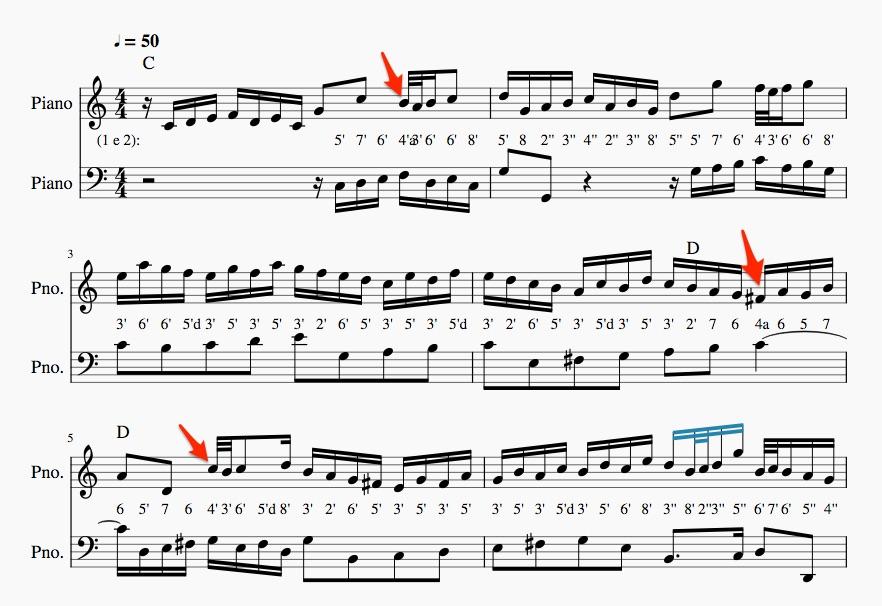
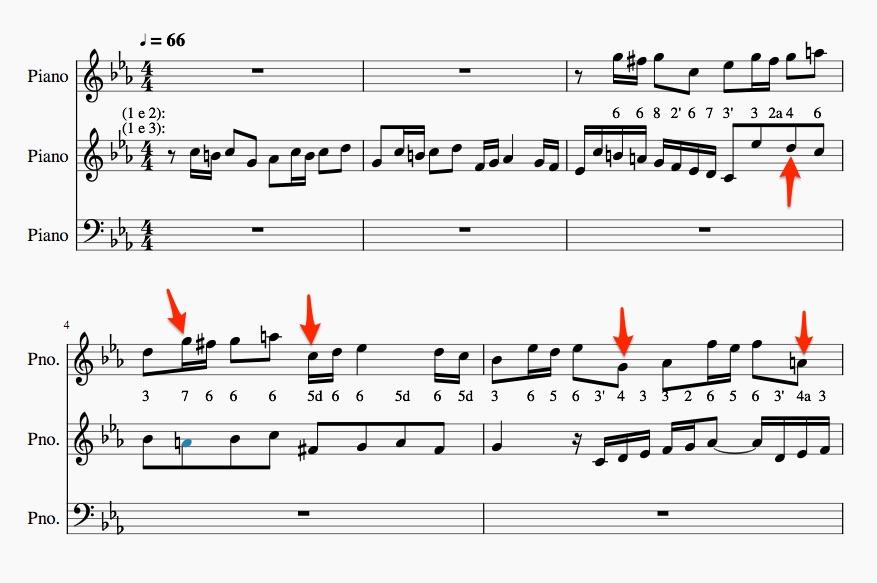
thank you for your kind reply. I realise these particular problems could be solved, but these are famous Bach tunes. I am wondering how to move from the species rules of counterpoint to actual writing of music. It seems that whenever I look at proper musical pieces, fugues etc, even the Fux book, the materlial is full of non-adherence to the rules. Is there a book, course, or something that can help me bridge the gap from species counterpoint to composition? (personally, I like the C-F# tritone in the example, it is the defining tritone of D7, but I understand it is not to be used under strict counterpoint...)
-
hello everyone, this is my first post, I am glad to have found this place! I am doing my species counterpoint believing that there would be few instances of broken rules in actual works. I thought that I would have to be very strict when writing a countersubject for example. Below are the beginning lines from invention 1 and fugue in c minor on which I have marked intervals that are "forbidden". How can I make the jump from strict species to actual writing? thank you in advance, Aristides.