January 24, 200818 yr ... how does this come off in performance? Is the sound satisfactory? Is it tinny? Woody? [removed] Any feedback is appreciated, thanks!
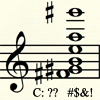
January 26, 200818 yr I don't play the bass, but I have a question about the notation. What does the diamond shaped symbol mean, and what does the note in parentheses mean?
January 27, 200818 yr Author The diamond-shaped note is the node touched on the E string, and the note in parentheses is the resultant pitch. (I over-notated for clarity on the question... normally one would either indicate the main note and the harmonic node, or the main note and the resultant pitch, not both) On a stringed instrument, if you touch a string at a point a perfect fourth higher than the fingered (or open) pitch, the resultant harmonic is two octaves above the fingered pitch.
August 21, 200916 yr Author Hi... I removed the link a while back since I was able to get a professional bassist to demonstrate and comment on the practice. To sum up: I was asking what a pizzicato artificial harmonic sounded like. Specifically, a 'touch fourth' harmonic on the open E string (sounding two octaves higher). The sound is indeed slightly 'woody', though not particularly 'tinny', with a 'thumpy' attack.
August 29, 200916 yr Yeah, the e string is NOT good for harmonics at all. G and D are good! A ...meh...


Join the conversation
You can post now and register later. If you have an account, sign in now to post with your account.