

Skip to content
View in the app

A better way to browse. Learn more.

Young Composers Music Forum

A full-screen app on your home screen with push notifications, badges and more.

To install this app on iOS and iPadOS
  1. Tap the Share icon in Safari
  2. Scroll the menu and tap Add to Home Screen.
  3. Tap Add in the top-right corner.
To install this app on Android
  1. Tap the 3-dot menu (⋮) in the top-right corner of the browser.
  2. Tap Add to Home screen or Install app.
  3. Confirm by tapping Install.

Sonata for Violin and Piano
Featured Replies

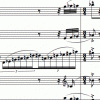
Further expanding on the harmonic and melodic direction that I started to develop with my "Ballade for Piano Quintet" and "Rhapsody for Orchestra," this is the first piece I wrote where I felt I achieved a style that is personal and unique. The overall atmosphere is dark and dramatic, interspersed with brief moments of repose. Of all of my compositions, this one seems to be the one that people respond to the most.

http://www.youngcomposers.com/profile/music/John%20Carey/composition?entry=60493

  • Author

Unfortunately, only the first movement has had a legitimate recording. I didn't bother uploading the Garritan rendition of the first movement, because it doesn't convey the character of the work nearly as well as the live performance (obviously), but for those who are interested in hearing it, it is available on my website.

  • Author

Hmm, the new system here is confusing me. When I click the link in the original post, it doesn't direct me to the page that contains the MP3s. Is anyone else having this problem?

I only have time to listen to the first movement...do you happen a score? Anyway, I think that it's fantastic writing. One problem(at least to me) is that the piano over whelms the violin a bit...but I'm figuring that that was only a matter of recording? Excellent though, I loved it.

excellent congratulation

Account

Navigation

Search

Search

Configure browser push notifications

Chrome (Android)
  1. Tap the lock icon next to the address bar.
  2. Tap Permissions → Notifications.
  3. Adjust your preference.
Chrome (Desktop)
  1. Click the padlock icon in the address bar.
  2. Select Site settings.
  3. Find Notifications and adjust your preference.