

Leaderboard
-
Tónskáld
Members1Points653Posts
Popular Content
Showing content with the highest reputation on 06/24/2022 in all areas
-
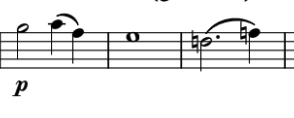
My two bits. I really enjoyed the esoteric nature of the piece. It was perhaps tonally "loose," but we stayed long enough in each tonal center to establish a feeling of familiarity. Nice job, that. The piano was somewhat of an annoyance, though. I feel it should be a bit louder and maybe even beefed up a bit to flesh out more of that crunchy harmony beneath. As it stands, the piano's dynamics don't balance well with the overbearing cello. But that might be owing to the software you used to render it. Melodically, I do feel like there are some weaknesses. It's wonderful that you give us rhythmic variation — the problem is that there is too much of it. Even if you aren't using clear themes or motifs, it's important to establish 1-3 musical patterns for the listener to grab onto. These could simply be a series of rhythms that are repeated throughout the piece (they don't even have to be the same intervals, although the same stepwise direction is advisable). For example, the cello opens with: [Half-note + 2 quarter, whole, dotted half + quarter] To provide the listener some melodic structure, you might have repeated this rhythm (or any of your chooosing) at other places throughout the piece without even reusing the pitches/intervals. It's not easy to strike that balance between predictability and seeming randomness... but it never hurts to try! Those issues notwithstanding, this is a relaxing piece of music and I'm glad you shared it with the forum. I hope you're able to get that recording!
 1 point