Search the Community
Showing results for tags 'pedal'.
Found 3 results
-
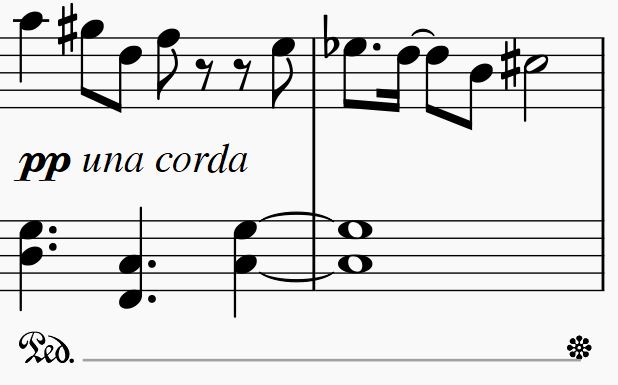
Hello everybody, I would like to know if it is possible to use TWO piano pedals at the same time, for example: Sustain pedal + una corda to have the mysterious mood of the una corda continued by the sustain pedal. Like: Kind regards, Maarten
-
I know that there is a line that can be written, as the pedal line, but indicating it is the sostenuto pedal. But I have found other scores that seem to call -or could be played with- the sostenuto pedal, without writting the lines. And I was asking myself if that is allowed. Also, if it is allowed, what is the best way to write it. In example, I have these two scores, that have the notes as indicating different instructions for two instruments -as in violins pentagram in an orchestral score-. Mussorgsky, Bilder einer Ausstellung, Promenade: Bach, Praeludium I, BMV 846 At the first one, in the G key pentagram, we can see two white notes, being played at the same time other black notes are played in the same pentagram. At the second one, at the F key pentagram, we can see again two white notes being played, and other notes played too. But you can see that the first one does not have silences for the second instrument to be quiet until played, and the second one does have silences. Obviously there are not a second instrument, and this indicates something that would be played with the same hand. The musescore program lets me put it or make it invisible. So I am not sure what to do here. If I am writing a score that requires the usage of the sostenuto pedal, may I write the sustained notes as if they were a second instrument, and without silences? Is it obligatory to use the pedal line? I think it looks better using the score as if there were two instruments. But I need to know if this would make my score unintelligible. I think it is more elegant than a lot of ligature lines, and easier to understand than a sostenuto pedal line (as you actually show what notes you want to be sustained). I was thinking in things like this: The second seems to be impossible to play without making the other not sustained not at the same time played, be sustained; or stretching a lot the fingers.
- 9 replies
-
- counterpoint
- mussorgsky
- bach
- piano
-
Tagged with:
-
Greetings, I'm trying to figure out the harp pedal tuning for my newest concert band piece. Your help will be greatly appreciated. Peace, C.L. Winston Nibiru - Harp.pdf