

Leaderboard


Popular Content
Showing content with the highest reputation on 02/14/2017 in all areas
-
1 pointWhat Ken said. Also, I would really appreciate if the score was laid out a little more cleanly, all dynamics below the staff, no dynamics in crescendo marks etc. Also consider slurs and phrase markings. These are essential in writing for winds, in my opinion. I find the easiest way to approach slur markings is to sing the melody to yourself and figure out where tongueing is most natural. I don't know if you are experienced with wind instruments, but this comes much more easily if you are.1 point
-
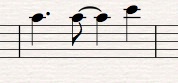
1 pointTaking you at your word that you have never composed before, I would say that it's pretty good. It has some interesting parts and some not so interesting. You make good use of 1st and 2nd endings. However, sometimes 2nd endings seem wasted whereas repeating a section "with variations" can be more interesting. Bar 10 would be better written as (see pic). But the biggest problem I see are the repeated notes. These make the music sound static and would be very boring for a player, and listener. And not very idiomatic for an oboe engaged in a duet. The parts should be of equal interest. I would suggest changing the repeated notes to chord outlines at least, or a proper counter melody.
 1 point