Leaderboard
-
DanielVolovets
Members1Points4Posts -
Thatguy v2.0
Moderators1Points1,360Posts -
AngelCityOutlaw
Members1Points763Posts -
Locrian7th
Members1Points12Posts



Popular Content
Showing content with the highest reputation on 11/19/2020 in all areas
-
1 pointA blues-rock tune I composed inspired by classic bands like ZZTop as well as 70s/80s American car chase movies. Let me know what you think! A friend of mine from a local metal band recorded the electric guitar parts.1 point
-
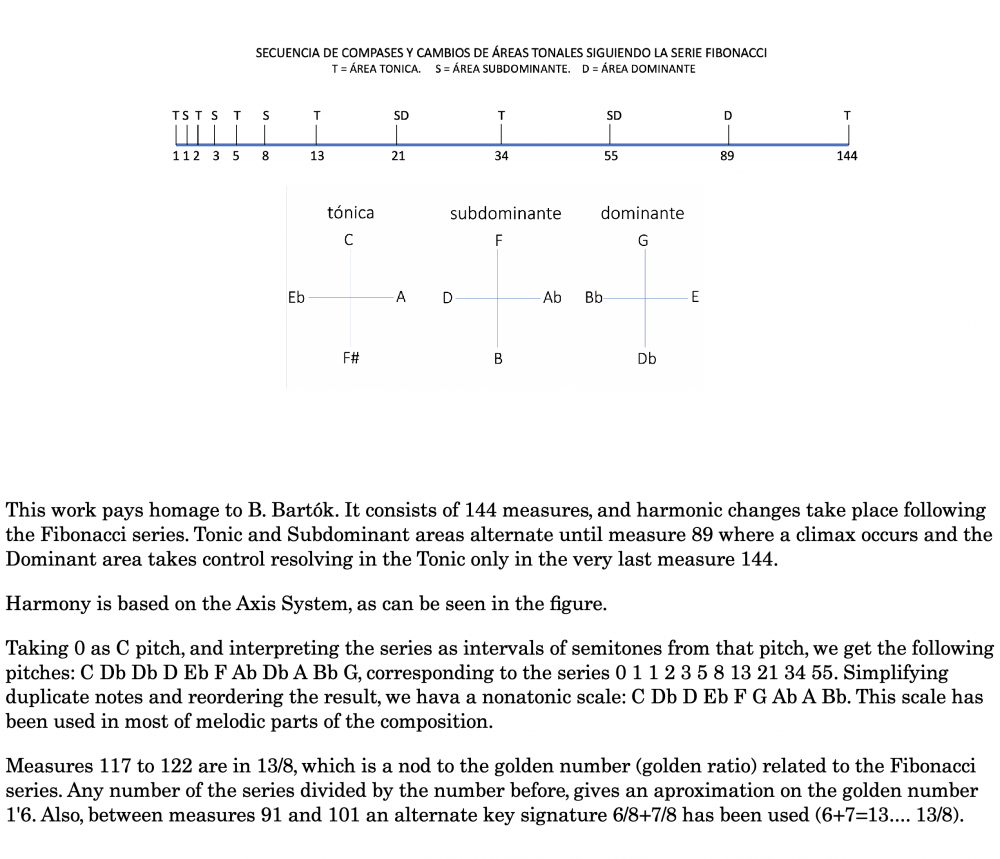
1 point1 pointHello everyone! My name is Daniel Volovets and I am a 28-year-old classical, flamenco, and jazz guitarist as well as medical resident specializing in psychiatry. I've been playing guitar since the age of 6 and started composing as a teenager. I came across this forum while looking for places to share my work and check out the music of other like-minded folks, so I'm excited to be a part of the community here. I'd like to share my latest composition, entitled "Windswept," which combines classical and flamenco influences. I hope you enjoy it!1 point1 pointI'm still learning to use the orchestra, but I can't write things in classic forms.... So, taking Bartók as a model for the Form, I used the Fibonacci series. This is in the notes of the score:
 1 pointThis is great! What a great change of pace from what we normally hear here, there's not too many guitarists as talented as yourself that roam these forums. I'm sure you have a lot of advice to offer, as well as sharing more of your compositions. Well done!1 point