Leaderboard
-
Rabbival507
Members2Points560Posts -

Monarcheon
Members1Points2,433Posts -
Luis Hernández
Members1Points3,400Posts -

AntonioGarcía
Members1Points28Posts



Popular Content
Showing content with the highest reputation on 05/21/2018 in all areas
-
2 pointsPut it in your "Ideas" folder and keep it for later. Actually I don't have any "ideas" folder because most of the time I just title ideas as... "idea". But my compositions folders are organized according to the period of creation (by period I mean... new level in musical development, last time I opened a new folder was after the first time an orchestra performed my piece) so they look that way: but you might consider creating an "ideas" folder. When I can't come up with a new thing I just look for a project named "idea" and start from there.
 2 points
 -
1 pointThis little piano piece is my dedication to the folk of Palestine...hope you find something beautiful in it.1 point
-
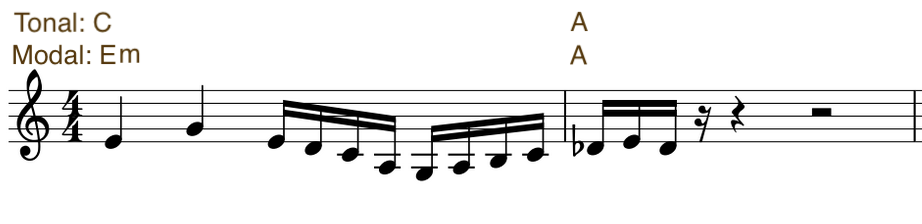
1 pointYou can do whatever you want. If you consider de Db as C#_ Tonal: Cmaj: C - A ...... (Dm).. Modal: E dorian: Em - A Or if you prefer, consider it as non functional. You can write a fugue, a canon, or what you want. As it is, it is only an ambiguous phrase.
 1 point
 -
1 pointIt doesn't really make much sense. Assuming this is tonal music, you have a leap in the melody on the fourth rhythmic unit of 16 notes, you use a Db followed by E natural in the next measure creating an augmented second, and the harmonic center seems to shift in the middle of the first bar.1 point
-
Hello! I would like to show you my new piece for piano and electronics. I'm waiting for your feedback and hopefully you enjoy it! Self-portrait (piano / electronics) - Antonio García (YouTube link)1 point